12. Crop Management
Crop management BMPs specifies the crop rotation, fertilizer application, tillage and gazing on a field. As this data is highly customized, it’s usually prepared manually and imported to bmp database.
AAFC crop inventory provides crop distribution each year based on remote sensing technology. Combined with default crop rotation, fertilizer application, tillage and gazing fro crop type, it’s possible to setup the crop management BMPs automatically. To use this feature, setup the crop_rotation section in the model configuration file in crop_rotation section. The setting items are given below.
method - the only option now is crop_inventory.
AAFC_crop_inventory_folder - the folder the crop inventory GeoTIFF files reside. The file name must be the year, e.g. 2025.tif.
first_year - the starting year of inventory data to read.
last_year - the ending year of inventory data to read.
include_grazing - the flag for grazing generation. By default it’s false.
One example is given below.
[crop_rotation]
method = crop_inventory
AAFC_crop_inventory_folder = C:\Work\Git\imWEBs\imWEBs-Python\notebooks\stc\data\crop_inventory
first_year = 1991
last_year = 2010
include_grazing = False
Users will need to download the crop inventory data for the years they are interested and clipped to the watershed boundary. It’s also required to have same coordination system as other input files.
Workflow
The workflow is described below.
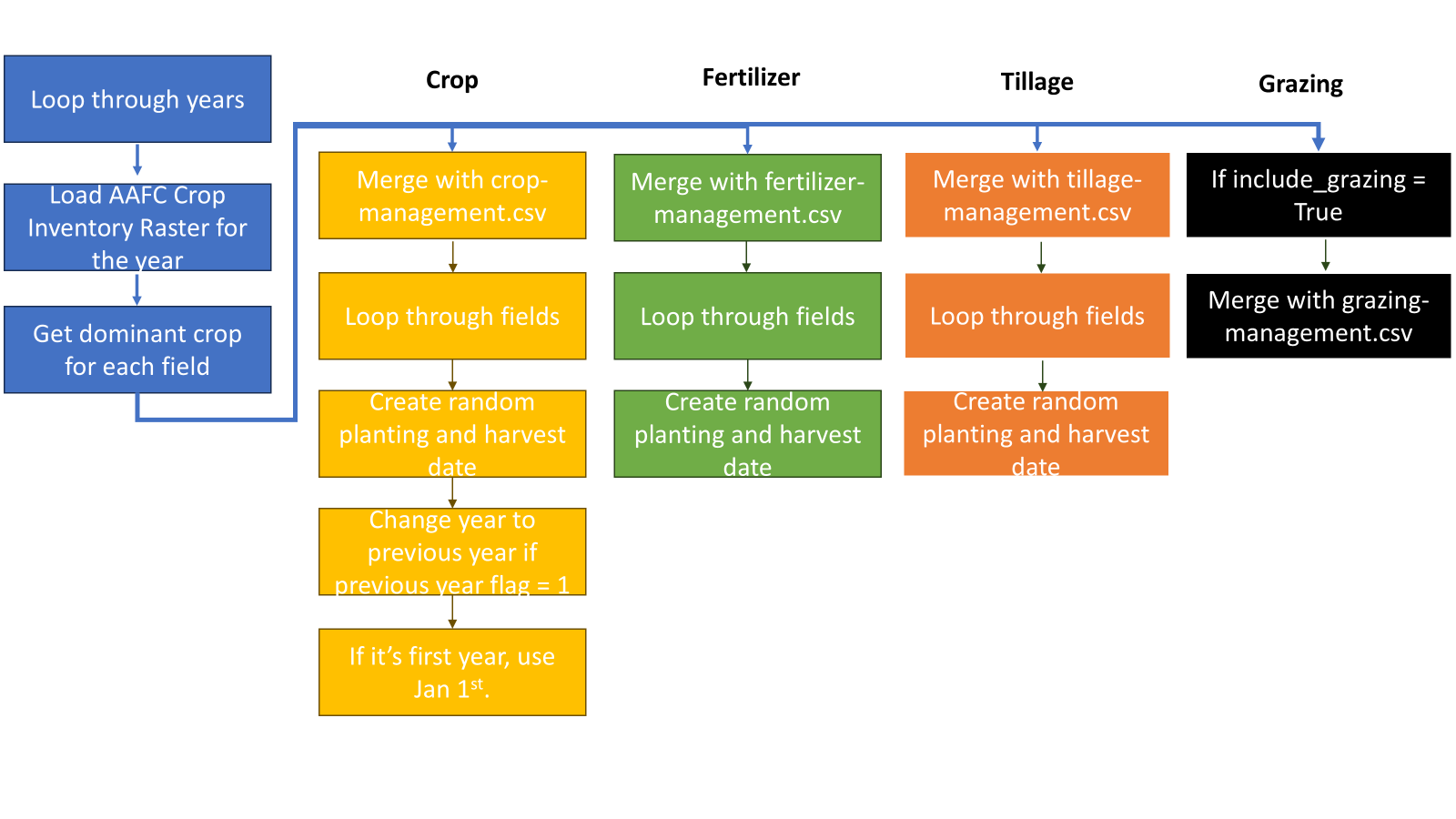
User-defined crop lookup table and default management data for crop, fertilizer and tillage
The system has default crop lookup table and default management data for crop, fertilizer and tillage. If users wants to use their own data, they could have these files in AAFC_crop_inventory_folder with the following file name. These files must follow the standard formats as given below.
crop-lookup.csv
Original ID Land use name Group IMWEBs code IMWEBs ID 10 Cloud Non-Crop Not proceed crop-management.csv
CropCode Pervious Year PlantingMon_First PlantingDay_First PlantingMon_Last PlantingDay_Last HarvestMon_First HarvestDay_First HarvestMon_Last HarvestDay_Last HarvestEfficiency HarvestType HarvestIndexOverride CNOP StoverFraction IsGrain PRCOP 1 0 5 8 5 21 9 24 10 7 0.85 2 0 1 0 1 1 fertilizer-management.csv
CropCode FerMon_First FerDay_First FerMon_Last FerDay_Last FerType FerRate FerSurface 1 -1000 -1000 -1000 -1000 1 70 0.2 tillage-management.csv
CropCode TillMon_First TillDay_First TillMon_Last TillDay_Last TillCode 1 -1000 -1000 -1000 -1000 35 1 -70 -70 -70 -70 86 grazing-management.csv
CropCode GraMon GraDay Days Ani_ID Ani_adult GR_Density DayFra Source Dugout_ID Access Fencing StreamAniPerc Drinking_time BankK_Change 12 5 1 180 2 100 1 1 1 0 0 0 0 0.02 0.3
Random Date
To simulate the behavior of farmers, plating, harvest, fertilizer and tillage dates could be generate randomly between a starting and ending day defined in the table. In each table, the starting and ending month/day is defined. This is only applied when month and day value is valid month and day values.
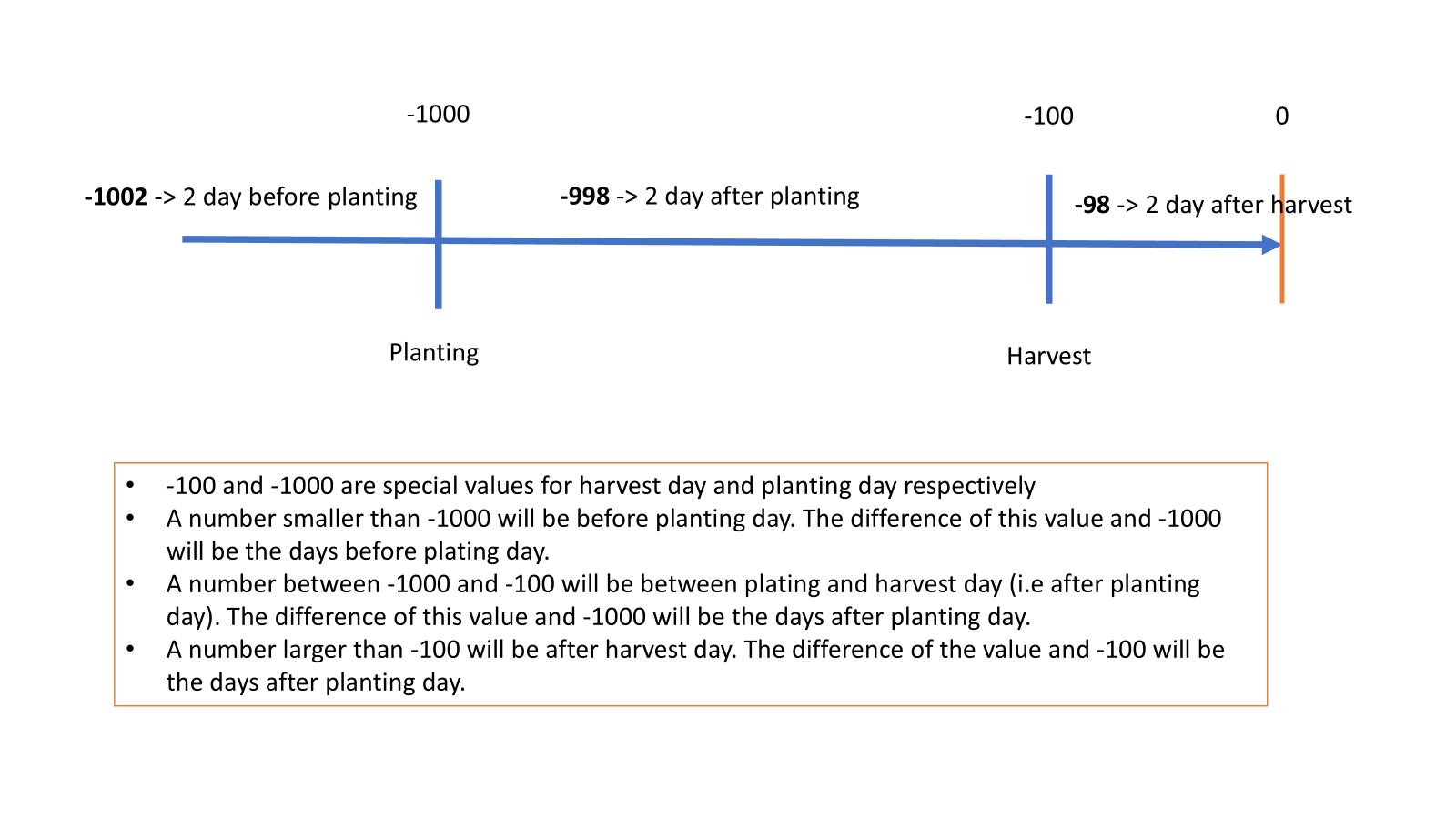
Negative Month and Day
The month and day could be negative for fertilizer and tillage. It’s illustrated in the following diagram. In this case, all four month/day column should have the same value.
Winter Wheat
If the previous year column is 1 in crop_management.csv, the system assumes it’s planted in previous year. For example, if the dominant crop in a field is winter wheat in 2000, the year in crop_management table will be 1999. The imWEBs engine will see it planted in 1999 and harvested in 2000.